Farlight 84: Beginner’s FAQs, Tips, and Guide
If you are new to Farlight 84, here are some FAQs, Tips, and Guide that you can use to help boost your game knowledge and experience. Learn how to adjust your game settings and keys while practicing in the Training Grounds, how to collect all freebies in the game, and more.
Farlight 84 is a fast-Paced Hero Battle Royale (MOBA Game), available for PC and Mobile.
Practice and Check Your Settings
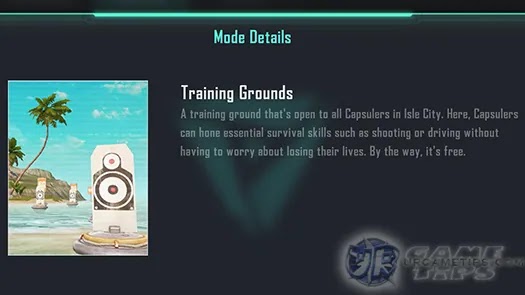
– If you are a newbie in Farlight 84, you might want to do some practice first by entering the Training Grounds under the Coliseum Mode. Here you can freely select any characters and check their Ultimate and Tactical Skills, test weapons, and drive test all vehicles.
 – Graphics = Adjust depending on your device and preference, restart game to apply the changes if needed.
– Mouse and Advanced Sensitivity Settings (PC)
– While you are in the Training Grounds, try to find the best sensitivity setting to improve your aim ( depends per person and mouse quality). Refer to our separate guide below:
– > How To Find Your Own Sensitivity Settings (PC)
– Sprinting Mode = Do not set to AUTO, this would automatically cancel what you are doing and run, like when you are using Med Kits while moving (during combat or while walking away from the Danger Zone). – You may experiment with these settings depending on your preference.
– Default Key (X) = Holster weapon. You might want to change this to other key to avoid mistakes (like when pressing C to use a tactical skill but pressing X instead). Personally, I am using (1), easy access to holster my weapon to increase speed while running, and for punching enemies when needed.
– Default Key (4) = Item Lottery. You might want to change this as well to use your items right away when needed, instead of using the Item Lottery. For example:
– (2) = Med Kit
– (3) = Shield Recharger
– (4) = Shield Restorer – *Use the mouse wheel to switch between weapons, instead of using default keys 1 and 2. 
How To Climb Walls?
– Make sure that you have enough space between the wall, jump towards it then press, spam or hold the Run key (For PC: Forward > Spacebar > press/spam/hold Left Shift). Also works after using jetpacks, use the Run key once you reach the wall. – Doesn’t work on certain walls though…
How To Run Faster?
– You need to holster your weapon, check custom Bind Key section above for more info.
– TIP: Open your inventory and move your primary weapon (or your weapon with longer range), above your 2nd weapon, to use that weapon first in case you need to draw your weapon.
– Double click the Mouse Wheel anywhere you want to place marks (ex: enemy locations).
– Press the Mouse Wheel while targeting enemies, easier when using weapons with better Scopes.
– You can also press and hold the Mouse Wheel to open up other options if you like (marker wheel). – You can press and hold the Mouse Wheel to open up some options (marker wheel). – You can also press the Mouse Wheel while targeting a location, any items on the ground, vehicles, and other stuff. – Use the Map and click any location to mark where you want to go. – Press “T”, the default key for PC users while standing on items. – You can also press the “~” key (PC) to use your mouse, then click the Hand icon to open up the loot list. Use the same key if suddenly you can’t move your camera or your hero is kinda stuck. – Move your car faster so it can drift. To drift, hold “Spacebar” + “A” or “D” at the same time then quickly release “W”. Continue pressing “A” or “D” to control your car while holding the “Spacebar”, then while doing this, press your “Heal Key” to heal.
Complete Your Missions
– Increase your Player Lvl to unlock new missions (Progression Tab), Lvl can be increased by getting Player XP after completing battles.
– Under Profile > Achievements, complete them as well to get more rewards (select the “Incomplete” option under the drop down Menu to check which missions you can complete). – Also check the Events section for more missions that you can complete for more freebies! – Go to Battle Pass > Missions to check your Missions, try to complete them all to unlock more rewards from your Battle Pass. – You can also check your progress by checking the MAP while in battle. 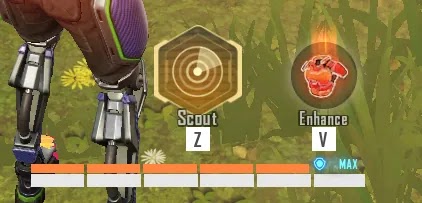 – Just getting Red Shields from any sources will not complete this mission. You need to equip an Orange Shield first then upgrade to a Red one by collecting Shield XP from killed enemies, chest modules, stationary Shield modules, and Shield XP items scattered on the ground.
– One other way (a bit risky) is to only upgrade your Shield Armor to Blue or Purple, then collect all Shield XP that you can until you can loot an Orange Shield from your enemies or from airdrops. Once you are able to equip an Orange Shield, then just upgrade it to a Red one (collect more Shield XP if needed).
– TIP: You can also try using Momoi’s Ultimate Skill to get more Shield XP and Armors especially early game.
– TIP: After winning Battle Royale, you now have extra time before the game ends, so use this time to collect Shield XP from your enemy loot boxes, for a chance to upgrade to a Red Shield.
– Rescue = Save them while they are down and still crawling.
– Revive = Save them after getting killed. – Some Missions would require you to do it multiple times in 1 Battle Royale. – Go to Coliseum > Solo Mode. – In Battle Royale, you need to kill at least one of those Outstanding Survivors (appears after the Hero Selection and Squad overview).
– Ranked matches are carried out in seasons, with each season lasting one month. When a season ends, your rank will be determined by the best tier you have reached (any mode). Furthermore, you start a new season with your previous season’s tier, but your score will be somewhat scaled down. – Every match you play, including Battle Royale and Deathmatch, will count toward your score. The system will match you with opponents and squadmates based on your score. – There are 8 Tiers: Bronze, Silver, Gold, Platinum, Diamond, Grandmaster, Ace, and Legend. – Unlock new ranks to obtain freebies, and try to reach the highest Rank to gain more rewards at the end of the season! 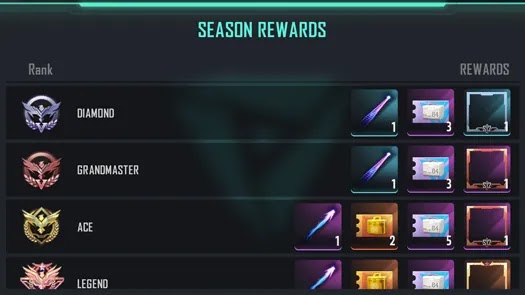 – Solo or Duo, your squad must survive until there are at least 25 players remaining, to get a higher chance to enter the top 16 Squad Rank for that game (minimum Rank to get positive points for Ace Tier onwards). – Your squad must survive until there are at least 20 players remaining, to get a higher chance to enter the top 8 Squad Rank for that game (minimum Rank to get positive points for Ace Tier onwards). – NOTE: Even if you die early, if your remaining teammates can reach the minimum Squad Rank to gain points, then you can also get those points. – You can get more Rank Points if you can enter the top 5 Squad Ranks in a row (starts after your 3rd Battle Royale). So even if you are the remaining member of your squad, try your best to survive for as long as you can if you want to get these bonus Rank Points. Good luck! ^^That’s it guys, thank you for checking our Beginner’s FAQs, Tips, and Guide for the fast-Paced Hero Battle Royale (MOBA Game) – Farlight 84.