Armies of Magic: How to Expand Boundaries
To access the expand boundaries option, Go to the Build menu and click the Boundaries icon. Here you can see the next upgrade and the requirements for expanding your boundaries. Refer below to learn more about Armies and Magic’s expansion feature.
◄Back to Armies of Magic FAQ, Tips, Tricks and Strategy Guides List
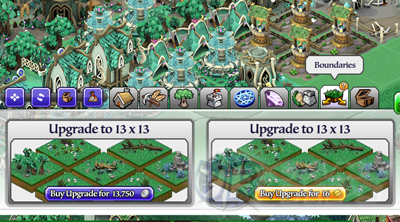
– Expansion –
Expanding your boundaries is really a big help for your city. It will give more space for your buildings, thus also increases your city’s overall growth rate! You won’t even have to upgrade your Cultural or Residential buildings until later game.
Requirements
– Each upgrade requires a number of allies. Invite friends to unlock the next upgrade. – You will either need to spend silver or you can use gold to expand instead. After purchasing an expansion, your boundaries will expand automatically. A new lane of spaces will be added at the bottom right and bottom left of your city.
Example Expansion: 12×12
– 12 spaces will become available at the bottom right side of your city. – 12 spaces will become available at the bottom left side of your city. – A total of 23 spaces will be added to your city after the upgrade!
______________________________________________________________________
Related Armies of Magic Tips & Guides:
Armies of Magic Tips, Tricks, Game Help and Info
Armies of Magic: Battle Strategies to Win Battles
Armies of Magic: How to Defend Your Capital or City or
– CLICK HERE TO BROWSE MORE ARMIES OF MAGIC TIPS & GUIDES –