MapleStory Adventures Tips and Tricks
◄Back to MapleStory Adventures FAQ, Tips, Tricks and Strategy Guides List Here are some Tips and Tricks that you can use for your online browser game: MapleStory Adventures. Learn the Basics and Advanced methods to quickly set your way through your Adventures. Good Luck playing your favorite Facebook game!
 |
| PLAY MAPLESTORY ADVENTURES ON FACEBOOK |
– The Basics –
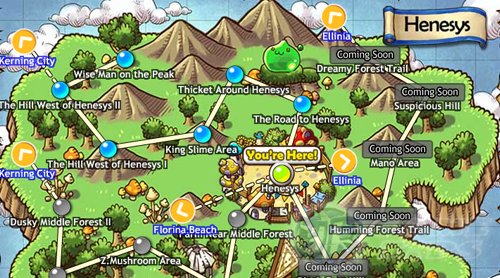
Navigation – Hold your left mouse button and drag your mouse to any direction to navigate around the map you are in. Very useful for searching NPCs (Non Player Character). – Use your Map to easily move between areas.
Bonuses

– Daily Bonus: Play multiple days in a row to get better bonuses! Resets at server time.
– Go to your Home and Claim your Daily Bonus at the Maple Mailbox. NEW! – Quests: Do your quests to gain more bonuses.
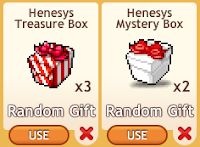
– Open up Mystery and Treasure Boxes to gain random bonuses. Dropped by monsters. – Complete collections and claim your rewards.
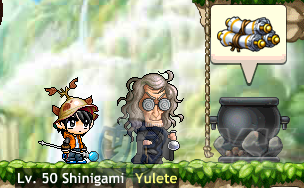
– Collect crafting materials and use them for Crafting (Talk to Yulete in your Home).
– Refer here for: How to Craft Items and Complete Quests NEW! – Send gifts to receive gifts from your friends. Resets at server time.

– Check your Facebook Wall or your friend’s Wall for Shared Bonuses. – When you run out of Energy, attack any monster to claim a random number of energy from the new energy chance window. Resets at server time.
Heart Level NEW!
– Hire your friends to increase your Heart Level and gain rewards! – Using returning Hires will net you more Heart EXP.
– Go to your neighbor’s Home and harvest your friend’s reactors! NEW!
– Refer here: MapleStory Adventures: Home Space Guide – At certain levels, you will be able to hire up to 3 friends at a time!
Solution for Claiming and Sending Gifts Bug! (Lessen Expired Links)
Sending/Requesting Items:
– First, Close the Message Center window. Do not send or claim any gifts for now. – Next, make sure to fully load the game and you are able to play MapleStory Adventures without the interruption of the Black Mage (loading error). – Send your gifts or requests to your friends then wait for at least 10 seconds. – To check if you successfully sent the items or requests, send the gift or request again. – If you can still see your friends in the list, send it again till they are no longer listed. – Finally, Wait for them to accept your gift or requests. – Make sure to click your Facebook Home to exit the game safely. – Works on all browsers and no need to clean your cache.
Receiving/Accepting Request Items:
– First, Close the Message Center window. Do not accept any gifts or requests for now. – Next, make sure to fully load the game and you are able to play MapleStory Adventures without the interruption of the Black Mage pop-up error.

– Open the Message Center window. Click the number next to the orange mushroom (upper right corner of your game screen) to open the Message Center. – Finally, Accept all gifts and requests. – Some gifts or requests might return an error message. Just ignore them. All steps above will work on all browsers and no need to clean your cache.
Hiring Friends
– Invite friends to help you in battle. – You can only hire the same friend once per day while Emily, Edward and other NPCs can be hired every 4 hours. – You can also hire friends who hired you (Returning Hires).
– Leveling and Questing –
– Every damage dealt by your enemies will deplete 1 Energy. Can be negated by blocks. – If you want to battle monster on flat areas only, exit the map and enter again. This will instantly respawn killed monsters. This is useful specially for long ranged characters. – Attacking higher leveled monsters than your Lvl = your attacks will MISS! a lot. – Attacking lower leveled monsters than your Lvl = higher items drop rate.
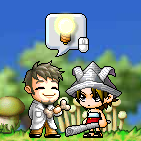
– After entering a new map, always accept side quests from NPCs to complete them head on while doing your main quests. – It is recommended to follow your Quests to easier understand the game.
General Leveling
– All Areas have a level requirement to unlock them. – Finish all quests to gain EXP boosts and more. – Enter newly unlocked areas as soon as possible to gain better EXP and rewards.
– Higher Damage Power will increase your EXP gain per Energy used.
– Start buying Lvl 10 and above gears from the Shop to increase your Damage Power. – Upgrade your Skills to gain more Damage Power. – Ideal number of attacks per normal monster: 4 and below. – Hire friends to increase your EXP gain plus 5 free Energy and gift bonuses. – Hunt monster Bosses for EXP boosts every time they respawn. – Use or request Energy giving consumables to increase your play time.
– Enchant your gears! NEW!
– Fore more in depth leveling guide refer to the link below.
– MapleStory Adventures Ultimate Leveling Guide
Enchanting
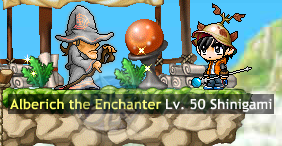
– Visit Alberich the Enchanter in your Home to help you Enchant your gears. NEW!
– Refer here: MapleStory Adventures Gear Enchantment Guide – Weapon – increases Critical Strike Chance – Hat – Lucky Chance (increases drop rates) – Cape – Lucky Chance (increases drop rates) – Coat – increases Block Chance – Long Coat – increases Block Chance – Pants – increases Block Chance – Gloves – increases Accuracy – Shoes – increases Accuracy
– Available Item Requests –
This section will cover all available item requests to fully take the advantage of gifting.

Lemons (+ 10 Energy) Requests – Empty your Energy Bar and use all energy consumables from your bag. – Attack a monster without any hired friends. If you can get free energy, use them first. – A notice will pop-up giving you a chance to request energies from your friends.
Skill Permits
– Use all Skill Permits by upgrading your skills. – Click the “Buy” or “Upgrade” button from the Skill upgrade window. – A notice will pop-up giving you a chance to request Skill Permits from your friends.
Golden Keys
– Use all Golden Keys by opening any Treasure Boxes that you want. – Click the “Use” button below the Treasure Boxes. – A notice will pop-up giving you a chance to request Golden Keys from your friends.
Quest Related

– Just click on the Quest Icon then click on “Ask Friend” button. – Some quests will post a Feed request to your Facebook Wall.
Related MapleStory Adventures Tips & Guides:
MapleStory Adventures Ultimate Leveling Guide
MapleStory Adventures Fashion Items List
MapleStory Adventures: How to Tame Monsters to Become Pets
MapleStory Adventures: How to Craft Items and Complete Quests
MapleStory Adventures: Infinite Energy Tricks or
– CLICK HERE TO BROWSE MORE MAPLESTORY ADVENTURES TIPS & GUIDES –