Marvel: Avengers Alliance: Report Game Error, Glitch, Issue or Problem
– Marvel: Avengers Alliance Support –
Playdom’s Support Page
– Click here: Create or Log in to Playdom’s Support Page – Please Note: You will not be able to contact support until you create and log in using your Playdom.com account. – Once you are logged in, click on the ‘Support’ button in the banner at the very top of the site, – Click once again on the ‘Log In to Ask a Question’ button at the top right corner. If you can’t find it, skip this step. – A Help box will appear at the bottom right side of the page. Similar to the below pic. 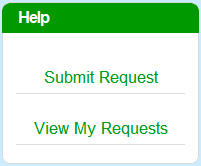 – Click on the ‘Submit Request’ option in this box to bring up the support ticket form. Fill out all the information requested and submit your ticket. You should receive a reply from one of our representatives within 72 hours.
Marvel: Avengers Alliance Known Issues
– If you are experiencing one of the following issues, Playdom is currently looking into the problem and will notify the community via the forums and the support portal with any updates. – Issues on this page can only be resolved by Engineering team and not by Support. List of Known Issues: – Unable to slot ISO-8 – button is grayed out. – Unable to access Store, Research or PVP – buttons are grayed out. – Unable to change heroes and or agent equipment before fight – buttons do not appear. – Previously purchased Phoenix and cannot access her Premium Mission. – Completed research but associated item is still locked. – Players are being forced to refresh their game client during and or shortly after completing a task, action, etc. – Losing Energy/Progress and or currency when game freezes, crashes, refreshes, etc. – DATA POST ERROR preventing some users from playing the game. – Unable to access next Chapter/Mission. – Agent names with special characters or symbols in their names do not load properly in the User Interface. – 4th Weapon Slot Unlocking Prematurely resulting in a trapped weapon. – Unable to upgrade Jet due to Refresh Error. – Unable to progress past the tutorial – do not have EMP grenade needed to progress. – Unable to progress past the tutorial – green arrow points to Air Traffic Control Mission but users are unable to complete this quest. – Cannot find Ally on Friends list / Can only visit Top 50 neighbors/friends/allies. – ISO-8 bonuses not properly applying to agents or heroes. – Agents making erratic movements when not engaged in battle. – Unable to train Hero – ‘Buy Uniform” option is listed where ‘Start Training’ should be. – Tier III Uniforms are not appearing in the store. – Heroes stuck in busy state when they are not actually busy (Some users have reported that the information in this article has helped resolve this issue). – Game Not Loading (Please use our recommended browsers: Chrome, Safari, Firefox and review the information provided here). – Game Crashes out due to Flash Player Crash (Ensure your version of Flash is up to date). – Can only access 3 minute remote ops missions. – Cannot accept all gifts/messages (Please visit this article). – Shockwave Stops Responding (Please check this article). – Cannot accept additional Distress Calls (Please read this article). – Not receiving XP for Remote Operations (Please read this article).
Source: Marvel: Avengers Alliance Know Issues
______________________________________________________________________
Related Marvel: Avengers Alliance Tips & Guides:
Marvel: Avengers Alliance Tips, Tricks, Game Help and Info or
– CLICK HERE TO BROWSE MORE MARVEL: AVENGERS ALLIANCE TIPS & GUIDES –