Pockie Ninja: 100% Ring or Talisman Valhalla Trick!
This guide will show you how to get 100% Ring or Talisman from Equipment Chests. Rings and Talismans are good additions to your gears and they can be used for a long period of time. Plus, they can be paired together to get a bonus stat from gear sets!
Important Note:
The guide below can also be applied to Pockie Ninja’s (PN II Upgrade). All Main Functions can still be found and are still working.
◄Back to Pockie Ninja FAQ, Tips, Tricks and Strategy Guides List
– Rings and Talismans –
Equipment Chests
– Random or Picked reward in the Flip Cards.
– Aim for Orange [3 stats] or Gold [4 stats] Equipment Chests!
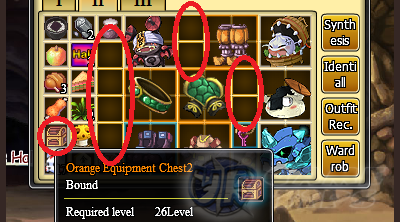
Step 1: – Open your inventory and look for the Equipment Chest. Refer to the screenshot above. – Arrange your equipments or items in your inventory windows. – Make sure that no armor or weapon can fit in your inventory! – You can also unequip your gears to fill out some slots too.
Step 2:
– Open or Use your Equipment Chest! – Ignore the message that will flash in your screen.

– Just keep on using your Equipment Chest until you get one! – Refer to the screenshot below.
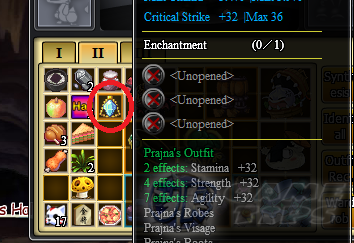
Step 3: – Check your new Ring or Talisman! – Note: You will lose the bonus stats below the item if you synthesize it! Use refine instead.
______________________________________________________________________
TIP: Having trouble getting party members in Valhalla?
– Here’s a simple trick!
Step 1:
– Recruit one of your apprentices. – Now your name will be placed in the “looking for party members” window. – You can get a lot of requests here because everyone can see your name! – Less hassle clicking everyone in the list and getting “declined” replies.
Step 2:
– If someone (preferred player) applied in your team, kick the apprentice!
Step 3:
– Accept another party member then move on to the stages!
______________________________________________________________________
– CLICK HERE TO BROWSE MORE POCKIE NINJA TIPS & GUIDES –