The Sims Social Tips, Tricks and Info
◄Back to The Sims Social FAQ, Tips, Tricks and Strategy Guides List Here are some Tips and Tricks for Electronic Arts’ The Sims Social – an online browser game on Facebook that replicates various activities in “real life” in the form of a game. Learn how to customize your Sim and live out their dreams!
 |
| PLAY THE SIMS SOCIAL ON FACEBOOK |
– Things to Mind –
Player Level
– Unlocks “Shop” and “Clothes” items. – Players are also called as Sims in game.
Lifetime Points
– Unlocks trait slots and enhances your Sim traits.

House Value – One objective of the game is to raise the value of your property. – Unlocks “Shop”, “Build” and “Clothes” items.

Simoleons, Sim Cash and Social Points – Used for purchasing “Shop” and “Clothes” items.

Energy – Used for doing social actions and interactions. – You can spend up to 5 free energies per friend visit. – Ask more energy from your friends. Available when you have no more energies left. – Drops occasionally from item interactions.
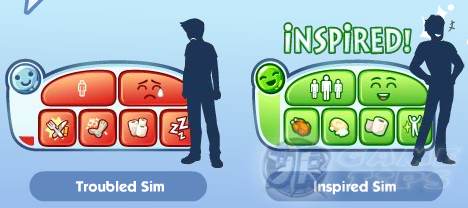
Get Inspired!
– Always get inspired before leveling any skills. It’s worth it!
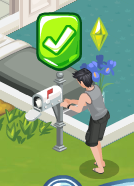
Tasks or Quests – Serves as your game walkthrough. Complete them all to get more rewards. – Keep in mind that The Sims Social is based in real life so think as if you are in it. – Example: Mailing or Receiving letters will require your Sim to use the mail box.
______________________________________________________________________
Building
– Players can’t customize room walls and the only way to enter a room is by building doors. Newly built rooms must have a door to access all items inside it. – To build rooms, doors, windows, tiles and wallpapers, Go to SHOP > Build. – To move, rotate or sell rooms, items and equipments, click on SHOP then click on the desired room, item or equipments to customize. Same when purchasing. – You can place outdoor items indoors if you want, and indoor items outside.
Repairing
– Some items must be repaired to be able to use them again. If you don’t want to repair them, visit your friend’s house and use theirs. – The more you use your own items, the more chance that it will break. When fulfilling your Sim’s needs, it is a good idea to use your friend’s items to reduce spending energies for repairing. Let your friends do the repairing instead.
Planting
– One basic way to gain Simoleons is through harvesting plants. – Be aware that untended plants will wither. harvest them before they do. – Example: Strawberry: 5 minutes before harvest and will wither after 10 minutes. – You can also ask your friends to visit your house and revive your plants.
Interactions or Conversations
– Repeating the same options will bore your Sim. – To remedy this, do other actions first then choose the option again. – You can queue up to 5 actions. – If you can’t reach an item, clear a path first. – Some items or equipments must have something to sit on to use them.
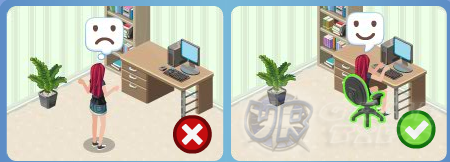
– To cook at a stove, the Sim will need an empty counter top to prepare the food on.
– Some tasks will require you to do certain actions several times but after performing an
action, the option will gray out.
Example: Daydream – the action can only be done once per chair. Chairs from your friend’s
house can be used as well.
Simple Leveling Method
– Honestly, this game doesn’t force you to do leveling that much but if you want to,
here is a simple widely known leveling method.
– Just rummage trashcans 5 times in your friend’s house. Easy free 50 XP!
– Make sure you keep your energy low while leveling because upon level up,
you will lose all remaining energy.
______________________________________________________________________
Related The Sims Social Tips & Guides:
The Sims Social: How to Get Crafting Ingredients or Parts
The Sims Social: How to Get Skill Ingredients or Parts
The Sims Social: Sims Traits Guide or
– CLICK HERE TO BROWSE MORE THE SIMS SOCIAL TIPS & GUIDES –